Tips at a 0% fee
A plain card tip carries no Landmark fee. Stripe's card fee still applies and the smallest tip is $0.50. A tip that sets off an effect carries the 20% fee instead, once per payment.
Tipping docsMore from Landmark
BlockBusters is the part most people ask about first. The same Landmark account also covers tips, overlays, camera effects and a page for your viewers. Everything below is live on landmark.stream today.
A plain card tip carries no Landmark fee. Stripe's card fee still applies and the smallest tip is $0.50. A tip that sets off an effect carries the 20% fee instead, once per payment.
Tipping docsBuild alerts and persistent widgets in the Elements editor, then place them on one overlay that runs as an OBS browser source. Events from every connected platform feed the same overlay.
Elements docsViewers can pay to restyle your live camera, priced per second. Face-tracked AR filters are a separate option that carries no usage cost.
Camera docsThree switches decide what is read aloud: chat, tips and bits, and alerts. Pick a voice, pick where it plays and block words.
TTS docsA public page at landmark.stream/@you with your stream, combined chat and everything viewers can spend on, in one link.
Portal docsMissions that pay Landmark credit or a badge, and check-ins that reward the people who keep showing up.
Quests docsA plain tip on your Landmark tip page goes through at 0% from Landmark. The only deduction is Stripe's card fee, which is 2.9% plus 30 cents at the US rate. Tips need no viewer account.
Landmark has one fee per payment. If a payment sets off an effect, a redeem or a game effect, the 20% fee applies once and nothing stacks on top. The fees page lists every case.
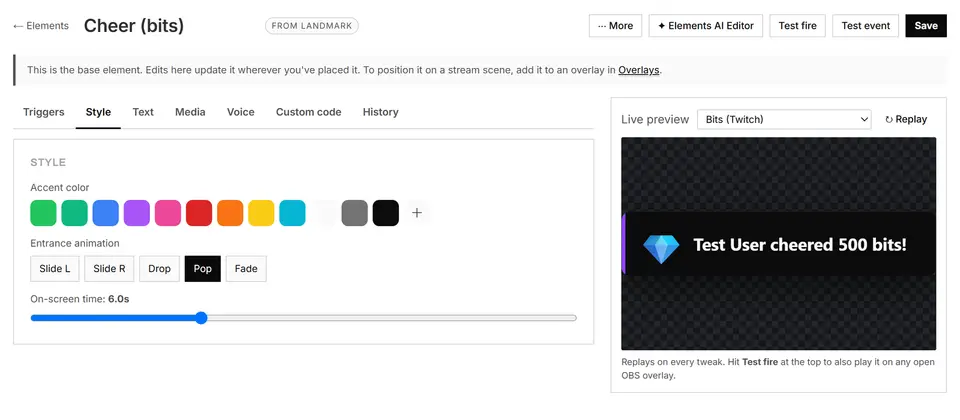
Elements are the building blocks of your on-screen look. An alert for a cheer, a chat box or a goal bar is an element, and you style it with accent colors, an entrance animation and an on-screen time. The editor shows a live preview as you change it, and a test fire plays it on your real OBS overlay.
Compose elements into overlays and add each overlay to OBS as a browser source. One overlay works for every connected platform, so a Kick gift and a Twitch cheer land in the same alert. Overlays and Elements carry no Landmark fee.
Landmark Camera turns viewer events into camera moments. A viewer pays and your live camera is restyled in real time for a short stretch. Usage is priced per second.
AR filters work differently. They are face-tracked layers such as hats and masks that render in your capture window, so they have no usage cost. Landmark keeps 20% of a filter payment, the same as other effects.
Text to speech has three switches: chat, tips and bits, and alerts read aloud. You pick the voice for each, choose where it plays and block words you never want read. There are free voices and voices that bill per character.
Connect Twitch, YouTube, Kick, TikTok and Rumble to one Landmark account and every event lands in one feed. An alert or an effect can be set off from any of them.
For the stream itself, Landmark recommends Rumble Studio for free multistreaming, and the official TikTok app for TikTok.
Every streamer gets a public Landmark page. Viewers watch, chat, send effects and tip there with one free account, and their coins work on any connected streamer.
Quests are missions that pay Landmark credit or a badge, and each reward claims once. Check-ins reward regular viewers with coins at steady milestones.
Landmark Desktop is the Windows app. It installs the Minecraft mod, docks your live feed over a fullscreen game, puts viewer effects on your real screen and runs lights and plugs that react to tips.
Landmark also has Media Share, where viewers send a link, a sound or a picture that plays on your overlay after approval, a soundboard viewers pay coins to play, polls that run across platforms, goal meters and subathon timers, and a schedule viewers can add to their calendar.
One signup covers all of this. The Minecraft mod is free and the rest is there when you want it.